
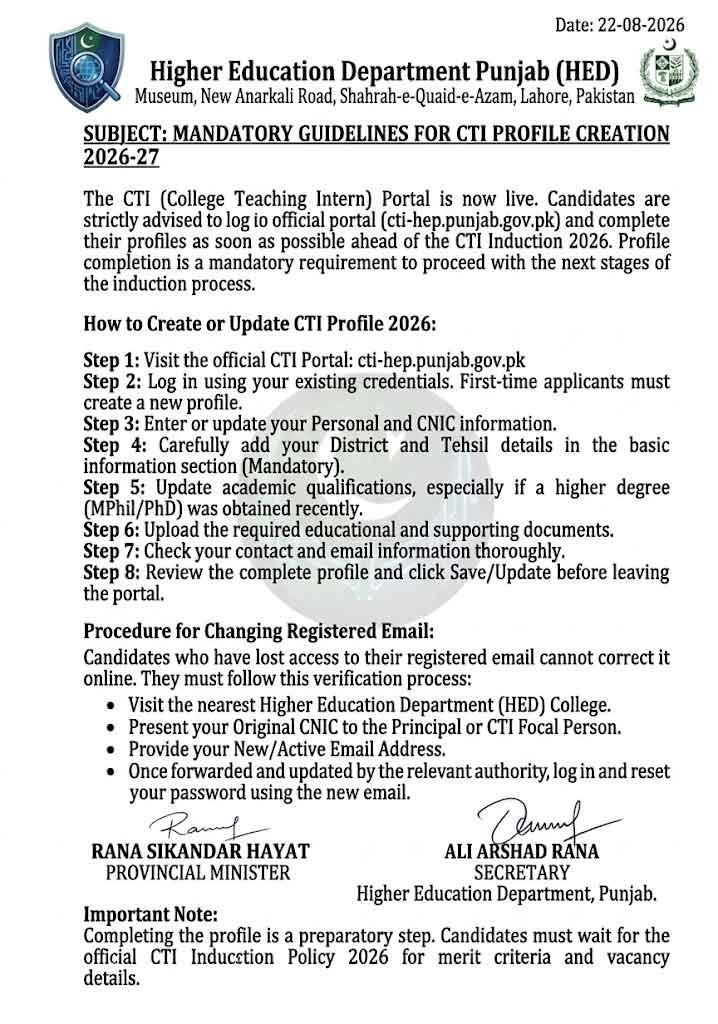
The CTI (College Teaching Intern) Portal is now live for candidates to create or update their profiles ahead of the CTI Induction 2026. The Higher Education Department (HED), Punjab has opened the CTI Portal 2026 2027 for candidates to create or update their profiles ahead of the CTI Induction 2026 process. Candidates are advised to log in to the official portal and complete their profiles as soon as possible.
Official CTI Portal: cti-hep.punjab.gov.pk
CTI Profile completion is an important requirement for candidates who want to proceed with the next stages of the CTI induction process.
CTI Portal 2026 27 Login Create CTIs Profile | cti-hep.punjab.gov.pk
The CTI Portal 2026 Login and Profile Creation process is an important step for candidates preparing for CTI Induction 2026 in Punjab. Applicants should complete their personal, academic and location information carefully and update any newly obtained qualifications. Candidates who have lost access to their registered email should follow the department’s stated verification procedure through a nearby HED college.
CTI Portal 2026 Profile Creation
Candidates should log in to the CTI Portal using their existing credentials. First-time applicants can create their profiles, while previous CTIs should update their existing information.
Candidates should make sure that all of the following information is complete and accurate:
- Personal information
- CNIC details
- Contact information
- Email address
- District and Tehsil
- Academic qualifications
- Relevant degrees and certificates
- Updated educational qualifications
- Required supporting documents
Candidates who have obtained a higher qualification since their previous CTI appointment, such as an MPhil or PhD, should update their academic information and upload the relevant documents.
How to Create or Update CTI Profile 2026
Follow these steps to complete your CTI profile:
- Visit the official CTI Portal 2026 cti-hep.punjab.gov.pk.
- Log in using your registered credentials.
- First-time applicants should create their profile.
- Enter or update personal information.
- Add your District and Tehsil details.
- Update your academic qualifications.
- Upload the required educational documents.
- Check your contact and email information.
- Review the complete profile carefully.
- Save/update the profile before leaving the portal.
Candidates should not leave required fields incomplete because profile completion is necessary for further processing.
CTI Portal 2026 District And Tehsil Information
According to the available instructions, candidates should provide their District and Tehsil information in the basic information section.
Applicants are advised to carefully select the correct location information and ensure that all required fields are completed.
CTI Induction Policy 2026
The CTI Induction Policy 2026 is expected to provide further details about the criteria and marks associated with positions and locations. Therefore, candidates should complete their profiles before the next stage of the induction process.
CTI Portal Forgot Email or Password
Candidates who have forgotten their registered email address or no longer have access to the email account may not be able to correct the email directly through the online portal.
The provided instructions indicate that such candidates should visit their nearest Higher Education Department college for verification.
The college does not necessarily have to be the same college where the candidate previously worked as a CTI.
Click Here For CTI Portal Login
Documents Required For Email Correction
Candidates should carry their:
- Original CNIC
- New/active email address
After reaching the college, candidates should contact the Principal or CTI focal person and explain that they need to update their registered email address.
The request can then be forwarded through the relevant departmental process for correction in the CTI system.
How to Change Registered Email on CTI Portal
If you have lost access to your old email, the process described for correction is:
- Visit the nearest HED College.
- Present your Original CNIC.
- Provide your New Email Address.
- Get verification from the Principal/CTI Focal Person.
- Request is forwarded to the Relevant Authority.
- Your Email Address is Updated.
- Log in to the CTI Portal.
- Reset your Password using the new email.
Once the registered email has been corrected, candidates can use the new email to receive the required OTP and regain access to their CTI account.
Important Instructions For CTI Candidates
Candidates should complete their profiles without unnecessary delay. In particular:
- Previous CTIs should update new qualifications.
- Upload relevant documents for newly obtained degrees.
- Enter correct District and Tehsil information.
- Check the registered email address.
- Make sure personal and academic information is accurate.
- Keep the original CNIC available for any physical verification requirement.
- Regularly check the official CTI Portal for new instructions.
CTI Induction Profile Completion
Completing the profile does not necessarily mean final selection for a CTI position. It is a preparatory/required step for candidates to participate in the subsequent induction process.
Candidates should wait for the official CTI Induction 2026 policy, vacancies, merit criteria and application/selection instructions issued by the Higher Education Department Punjab.
CTI Portal Login
Candidates can access the official portal here:
CTI Portal: CTI Portal 2026 Login
After logging in, candidates should complete or update their profiles and verify all information before submitting/saving the changes.
Frequently Asked Questions
Is CTI Portal 2026 open for profile creation?
The provided announcement states that the CTI Portal is open for candidates to create or update their profiles ahead of CTI Induction 2026.
What should previous CTIs do?
Previous CTIs should log in and update their profiles, particularly if they have obtained additional qualifications such as MPhil or PhD degrees.
What if I forgot my registered email?
If you no longer have access to your registered email, the provided instructions advise visiting the nearest HED college with your original CNIC and providing your new email address for verification and correction.
Is District and Tehsil information required?
Yes. Candidates are advised to complete their District and Tehsil information in the basic profile section.
Where can I log in to the CTI Portal?
Candidates can access the official CTI Portal at cti-hep.punjab.gov.pk.